Use DocKit GUI connect to Database Server
DocKit as a NoSQL GUI client, it supports multiple databases, including Elasticsearch, OpenSearch, DynamoDB, and more to come. This document outlines how to connect to a database server using DocKit.
Install and Open DocKit
you can find detailed instructions on how to install and open DocKit in the installation guide.
Connect to Elasticsearch Server
After opening DocKit, click the + New connection button to add a new connection, then you can input the Elasticsearch server information, including the connection name, host, port, and authentication information. 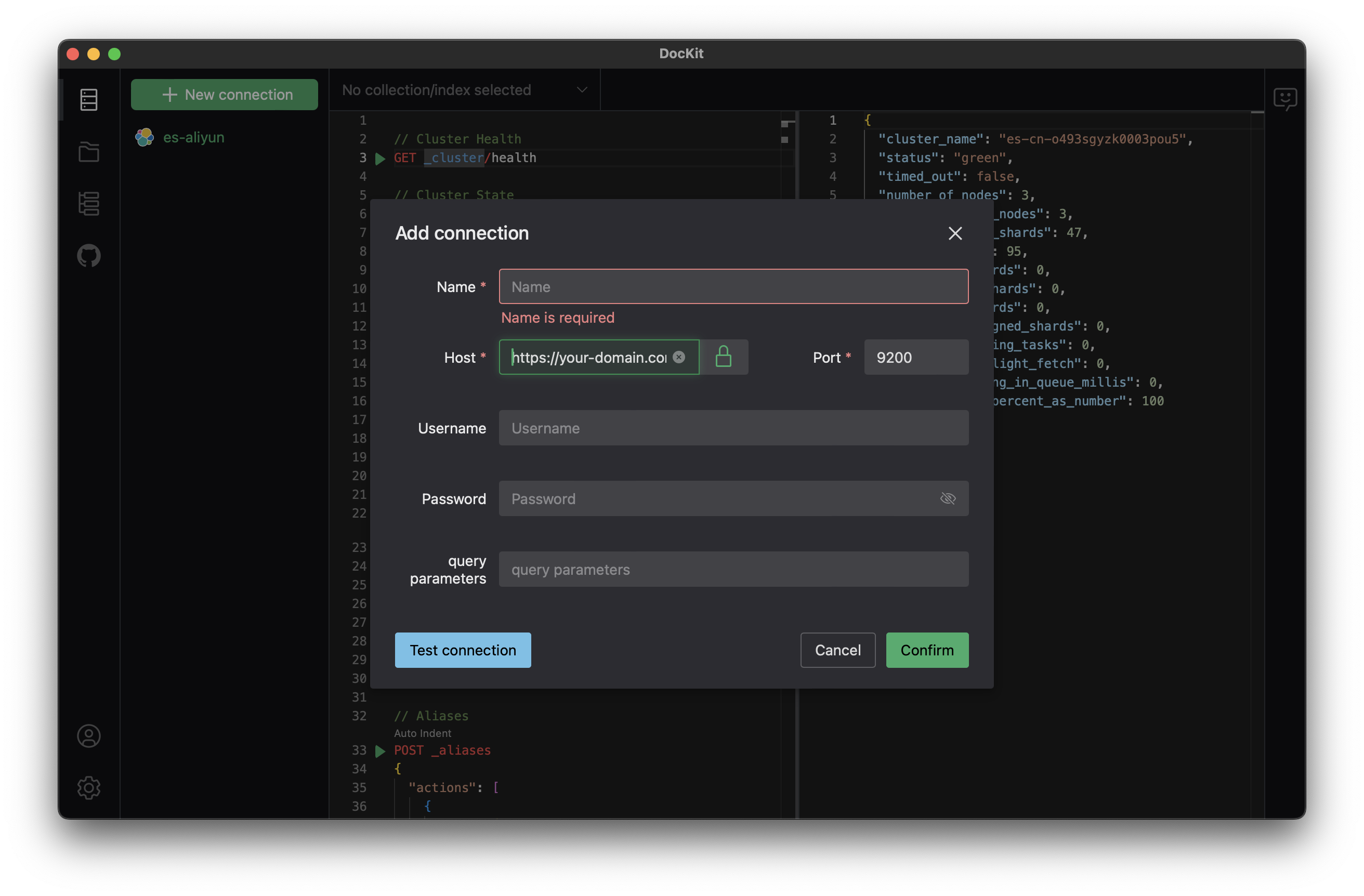
Notice:
- the host requires a comprehensive domain include protocol
httporhttps - if you try to connect to a self-signed Elasticsearch server, you can disable the certificate validation by unblock the 🔒
- if your Elasticsearch server requires authentication, you can input the username and password to connect to it
Test connection
once all your input finish, simply click the Test Connection button to verify if DocKit can connect to the configured Elasticsearch server
Notice: Test and Save the connection requires permission view_index_metadata at least, and specify the index name if your user's role has no permission to access all indices.
Save Connection
Simply Click Confirm to save Connections so you can always access target Elasticsearch server with DocKit.